
Black Flag Resynced Console Graphics Modes: PS5, PS5 Pro, and Xbox Explained

The short answer
Choose Performance if you value 60 FPS response, Fidelity if you value the richest lighting presentation at 30 FPS, and Balanced only when you have a 120 Hz display and want the 40 FPS middle ground. On PS5, PS5 Pro, and Xbox Series X, Ubisoft’s official chart lists all three targets. Xbox Series S is the exception: its chart lists a 30 FPS Fidelity mode at 1620p upscaled.
The choice is not cosmetic menu clutter. It decides the frame-time feel of parkour, sword fights, and naval aiming. Do not choose Fidelity because it has the prettier name if 30 FPS makes your inputs feel sluggish. Do not choose Performance because 60 looks impressive on a specification table if you actually care more about the visual features you are giving up.
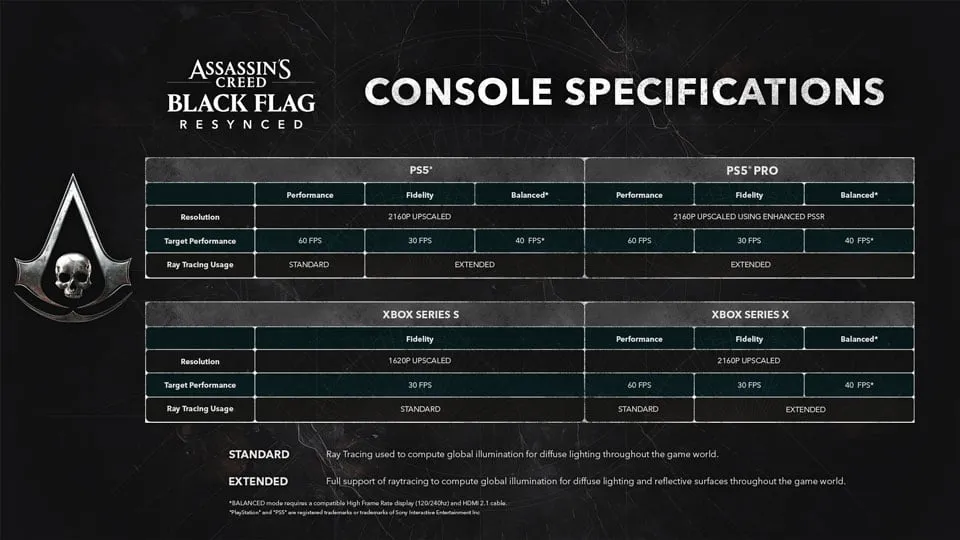
The official targets at a glance
| Platform | Performance | Fidelity | Balanced |
|---|---|---|---|
| PS5 | 2160p upscaled, 60 FPS | 2160p upscaled, 30 FPS | 2160p upscaled, 40 FPS on 120 Hz displays |
| PS5 Pro | 2160p upscaled with enhanced PSSR, 60 FPS | 2160p upscaled with enhanced PSSR, 30 FPS | 2160p upscaled with enhanced PSSR, 40 FPS on 120 Hz displays |
| Xbox Series X | 2160p upscaled, 60 FPS | 2160p upscaled, 30 FPS | 2160p upscaled, 40 FPS on 120 Hz displays |
| Xbox Series S | Not listed | 1620p upscaled, 30 FPS | Not listed |
These are targets from Ubisoft’s launch chart, not a guarantee that every television, VRR setting, capture device, or unusually demanding scene behaves identically. They are still the right starting point because they are the official platform-level intent.
Performance: the default for action-first players
Performance targets 60 FPS on PS5, PS5 Pro, and Series X. Pick it when you spend most of your time reacting: parries, Perfect Dodges, quick shots, evasive naval steering, and parkour all benefit from lower perceived input delay and more frequent motion updates.
It is the editorial recommendation for a first playthrough unless you already know that you prefer cinematic image quality over responsiveness. Black Flag’s rhythm is physical. A faster camera pan and clearer sense of timing can matter more than one extra layer of visual richness when you are learning a fight.
The chart labels Performance ray tracing as Standard. Ubisoft’s launch guide adds that ray-traced global illumination is present across modes, while Fidelity adds ray-traced reflections. In other words, Performance is not a barebones escape hatch; it is the smoother tradeoff.
Fidelity: choose it for visual inspection, not reflex testing
Fidelity targets 30 FPS and uses the chart’s Extended ray-tracing designation. Ubisoft describes Fidelity as the mode prioritizing visual quality, with ray-traced reflections added on top of the global illumination available across modes.
That is a sensible choice for slow exploration, photography, or a player who simply prefers a more cinematic motion profile. It is less compelling for someone currently struggling with reactive combat or naval encounters. The game will not become impossible at 30 FPS; the point is that you should choose the feeling deliberately rather than treating the most expensive visual option as automatically superior.
PS5 Pro’s Fidelity path uses enhanced PSSR in Ubisoft’s chart. That is a platform-specific image-processing note, not a reason to promise a different frame-rate target: it remains 30 FPS.
Balanced: excellent when the display really supports it
Balanced targets 40 FPS on PS5, PS5 Pro, and Series X, but Ubisoft explicitly ties it to a 120 Hz display. Check your console output and television or monitor settings before assuming the option will be useful. A panel that advertises gaming features but is not actually operating at 120 Hz will not deliver the intended cadence.
Forty FPS is not a halfhearted version of 60. On a correctly configured 120 Hz display, it is a meaningful midpoint: smoother than 30 while preserving more visual ambition than the highest-performance path. It is the best experiment for players who notice 30 FPS immediately but find 60 FPS Performance too visually compromised for their taste.
Series S: do not chase a missing menu option
The official chart lists Fidelity at 1620p upscaled and 30 FPS for Xbox Series S, with Standard ray tracing. It does not list Performance or Balanced for Series S. That is the relevant fact; avoid forum advice that assumes the Series X menu is present unchanged on every Xbox.
The practical approach is to ensure the console output and display are set cleanly, then judge the supplied mode in real gameplay. Do not use a Series S omission as proof that the game is broken, and do not expect a hidden 60 FPS switch based on another platform’s specification table.
Test with a real workload
After choosing a mode, test three things: a crowded city route, a naval fight with effects on screen, and a fast ground-combat encounter. A tranquil deck at sunrise is pleasant but tells you very little about the mode you will live with during a fort assault.
Keep variable-refresh-rate settings and television game mode consistent while testing. Changing the console’s output mode, a TV’s motion processing, and the in-game graphics mode simultaneously makes it impossible to know which setting changed the feel.
For system requirements and PC-specific concerns, see PC system requirements and the PC known issues guide.
Sources
← Back to Guides