Black Flag Resynced Difficulty Settings Explained: Combat, Stealth, Naval, Activities

The short answer
Do not use one global difficulty identity in Black Flag Resynced: set Combat, Stealth, Naval Combat, and Activities independently. Put the part you are learning on the easier end, keep the part you enjoy on the intended middle setting, and raise only the system you genuinely want to master. Ubisoft says these settings can be changed during play, so there is no reason to let one miserable mission type dictate the entire campaign.
The best starting recommendation for most players is the middle tier across all four categories, then lower only the recurring pain point. Great at sword fights but repeatedly caught while tailing? Leave Combat alone and reduce Stealth. Love infiltration but dislike ship duels? Keep Stealth challenging and soften Naval Combat. That is exactly the kind of choice this system exists to enable.
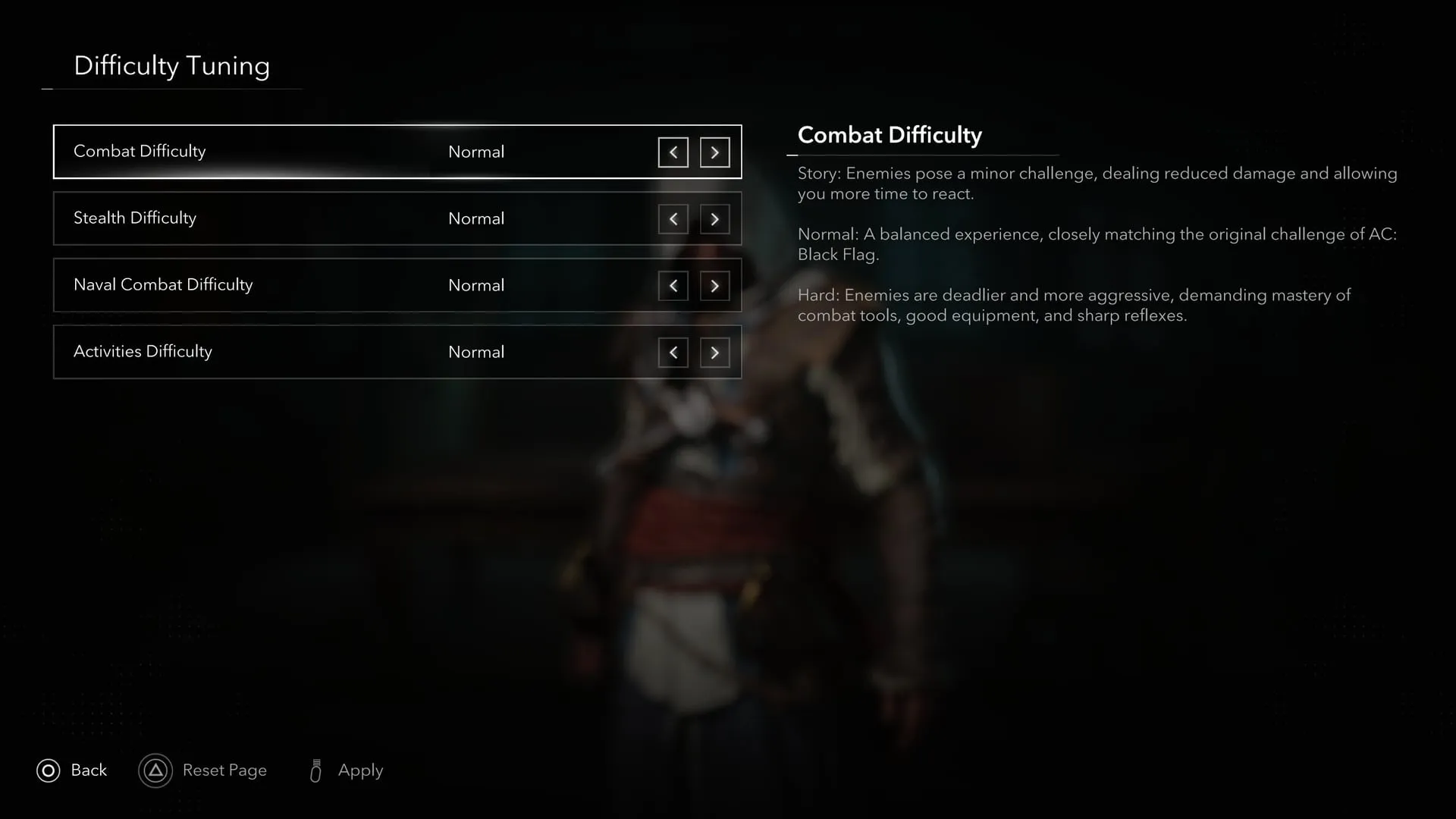
Four sliders, not one hidden master setting
Ubisoft identifies four separate difficulty categories: Combat, Stealth, Naval Combat, and Activities. Its long-form deep dive describes three roles as Forgiving, Intended, and Hard, while the official menu image uses Story, Normal, and Hard. Because those official assets do not use identical names for the first two tiers, use the menu currently installed on your platform as the authority for labels. The meaningful behavior is consistent: a lower story-friendly option, a middle original-like option, and a harder challenge option.
The middle tier is Ubisoft’s intended default and is described as closest to the original Black Flag’s balance. Start there when you want a familiar action-adventure baseline. The point of the system is not to award points for leaving every dial at Hard; it is to remove artificial spikes between activities that demand different skills.
Combat difficulty changes pressure, not just numbers
Combat difficulty affects melee encounters outside stealth: dry land, forts, and enemy decks. Ubisoft says it changes how many enemies actively attack Edward when he is surrounded, how frequently they attack, and the damage from Edward’s own attacks.
Lower it if crowds become unreadable while you are still learning parry, dodge, Sweep, Quick Shot, and takedown flow. Raise it if normal brawls have become routine and you want opponents to pressure you more consistently. Do not change Stealth at the same time when testing combat; otherwise a failed approach can blur together detection and open fighting.
For the mechanics themselves, see whether Black Flag Resynced has a block button.
Stealth difficulty governs detection and the aftermath
Stealth difficulty changes detection distance, the time enemies take to spot Edward while he is partly concealed or far away, how long they search after suspicion or alert, and which state they enter after high-profile actions. It is the correct dial for players who want more room to learn routes without turning every sword fight into a softer encounter.
Keep Stealth at the middle tier for your first pass through a city. Lower it if you are practicing visibility, crowds, and approach routes. Raise it when you know the route and want light, shadow, and low-profile movement to demand more precision. The mistake is lowering Combat because you failed an infiltration: that makes the fallback fight easier without fixing the detection problem that caused it.
Naval Combat difficulty changes both sides of the exchange
Naval Combat changes Jackdaw damage against enemies, brace effectiveness, whether damage repairs automatically outside combat, enemy ship damage, enemy ram cooldowns, and hostile-fort damage and cooldowns. That is a wide set of effects, so it is the most important difficulty dial to adjust before declaring a ship upgrade path inadequate.
If you are learning to read cannon arcs and brace timing, reduce Naval Combat temporarily. If you are preparing for higher-risk encounters, move it back toward the intended tier before concluding that a build is ready. A lower setting can teach a pattern; it should not quietly become evidence that the Jackdaw is prepared for every dangerous ship.
Pair the setting with concrete progression: board valuable disabled ships, recruit Jackdaw officers, and unlock upgrade tiers through Great Inagua.
Activities difficulty covers diving and harpooning
Activities means shipwreck exploration and harpooning. Ubisoft says this setting affects creature damage, spawn frequency, Edward’s time to dodge incoming attacks, his outgoing and incoming damage, and even interruption behavior. At the hard end, preventing some incoming attacks requires a perfect response.
That makes Activities the least useful setting to change preemptively. Leave it at the middle tier until you are actually diving or hunting. Then adjust it based on whether you want a calmer collectible run or a sharper mechanical challenge. There is no editorial virtue in making underwater exploration harder while you are primarily there to find a map reward.
Recommended combinations
| You want… | Combat | Stealth | Naval | Activities |
|---|---|---|---|---|
| Story and exploration | Lower | Lower | Lower | Lower |
| A familiar first playthrough | Middle | Middle | Middle | Middle |
| Tough fights, forgiving infiltration | Higher | Lower | Middle | Middle |
| Exact stealth routes, relaxed sailing | Middle | Higher | Lower | Middle |
| Strong naval challenge only | Middle | Middle | Higher | Middle |
Use these as experiments, not commandments. Change one category, play a representative activity, and decide whether the result is more interesting or merely more annoying.
HUD is separate from difficulty
Ubisoft also offers a fully customizable HUD, four HUD presets, and adaptive elements that appear only when relevant. HUD changes how much information you see; difficulty changes how the world responds. Do not hide a useful warning and then blame the Naval Combat slider for a worse outcome. Tune information and challenge separately.
The practical takeaway is simple: choose the middle tier first, isolate the system causing friction, adjust only that dial, and reassess after a real mission. Resynced finally lets you tailor the Caribbean’s different disciplines independently. Use that freedom with intent.
Sources
← Back to Guides